 Scribba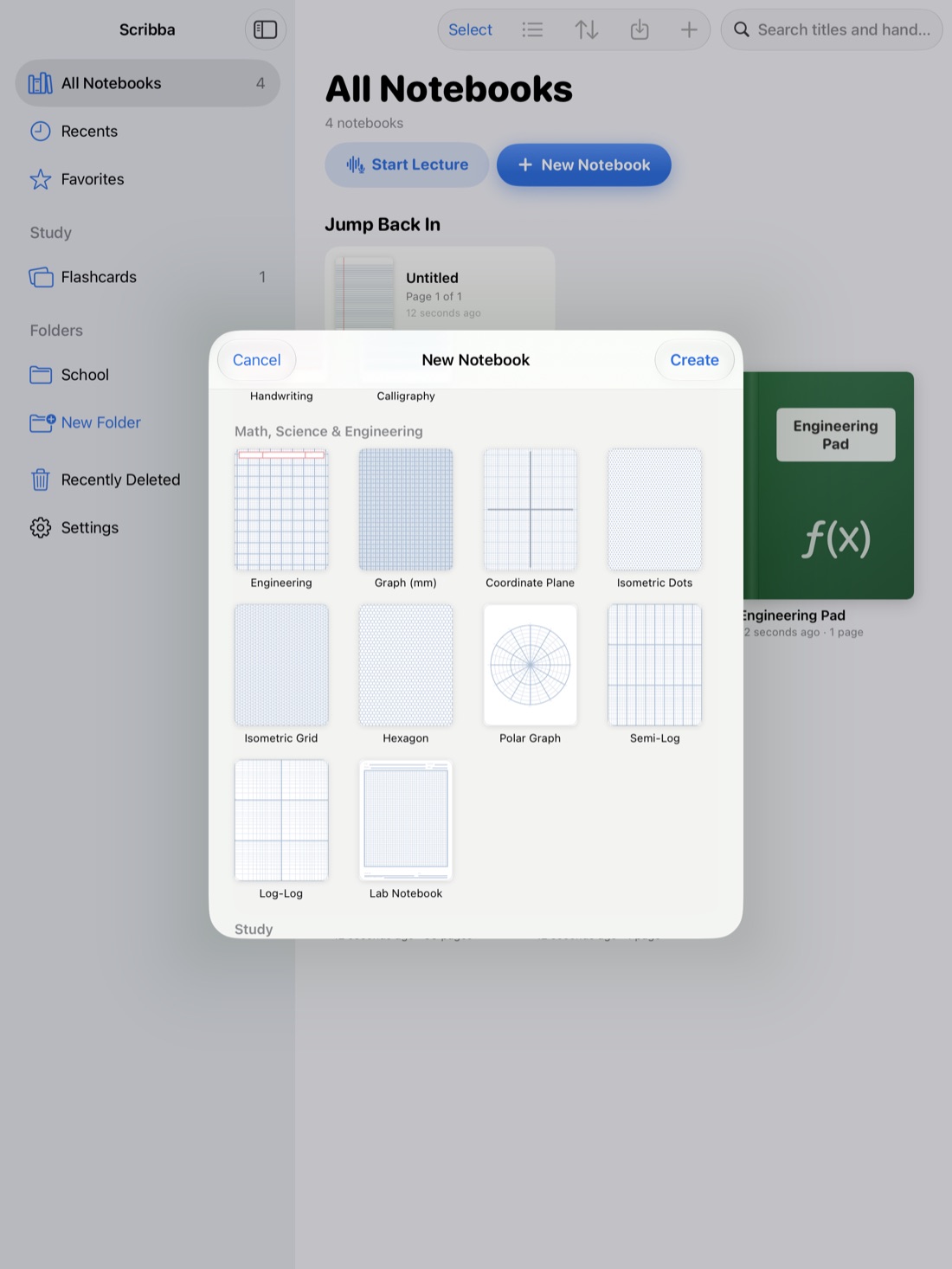
With paper notebooks, you buy one kind and live with it all semester. On an iPad, every page can have different paper. That's a real advantage, as long as you pick paper that fits the work you're doing.
This guide goes class by class: what each kind of paper is good for, and when to switch. Scribba has 39 paper types, so we'll point out where to find each one.
Why paper choice matters
Lines and grids do quiet work. Ruled lines keep your handwriting a steady size and straight across the page. Grids line up equations, tables and diagrams. Structured templates, like Cornell notes, build a study habit into the page itself.
The wrong paper fights you. Drawing a titration curve on ruled lines is awkward, and so is writing a long essay outline on a dense graph grid. A minute spent choosing paper at the start of the semester saves that friction in every class.
Lecture-heavy classes
For history, psychology, sociology, literature and other classes that are mostly talking, you want plenty of room for words.
- Ruled paper is the default for a reason. Scribba has narrow, college and wide ruled. College ruled suits most people. Narrow fits more on a page if you write small. Wide is easier if your iPad handwriting runs large.
- Cornell notes split the page into a main notes area, a narrow cue column and a summary at the bottom. You take notes during class, then write questions in the cue column and a short summary afterward. The method was developed at Cornell University, and it's a good fit for any class with lots to review. See Cornell notes on iPad.
- Lecture notes paper is another option made for in-class notes.
- Legal pad and journal papers suit students who like a looser, freer page.
Tip: if you write in Cornell Notes paper, Scribba can read your handwriting and turn each cue into a flashcard. That works on any iPad, with no Apple Intelligence needed.
Math, science and engineering
For anything with numbers, a grid keeps your work lined up. It's much easier to spot a mistake when each step sits directly under the last.
- Grid and dot grid are the all-rounders. Dot grid gives you structure with less visual clutter, which suits pages that mix writing and diagrams.
- Graph (mm) has a fine grid for plotting data by hand.
- Engineering paper is the classic choice for engineering and physics problem sets.
- Coordinate plane saves you drawing axes every time you graph a function. Polar paper does the same for polar coordinates.
- Semi-log and log-log papers are for data that spans a huge range, like exponential growth or decay in a lab.
- Isometric dots and isometric grid help with 3D sketches, from engineering drawings to crystal structures.
- Hexagon paper is handy for organic chemistry, where so many structures are built from rings.
- Problem set paper is laid out for homework, and lab notebook paper for lab classes.
In Scribba, graph papers run edge to edge, so the grid fills the whole page. For more on these classes, read math and chemistry notes on iPad.
Languages and vocabulary
Language classes are mostly memorization, so paper that feeds your flashcards is worth using.
- Vocabulary paper is laid out in rows. Scribba reads your handwriting and turns each row into a flashcard, so the list you write in class becomes a study deck. Learn more in flashcards from handwritten notes.
- Index cards work well for quick self-quizzing.
- Handwriting practice and calligraphy papers help when you're learning a new script or want neater letters.
Music, art and film
- Music staff for theory and composition, and guitar tab for guitar.
- Storyboard and comic panels for film, animation and visual storytelling classes.
- Perspective paper for drawing classes.
Planning your semester
Notes are only half of college. Scribba also has papers for keeping the rest in order: class schedule, to-do, daily, weekly and monthly planners, habit tracker, meeting notes for group projects, plus bullet journal and daily journal pages.
Dated planners go further. You can create a planner that covers anything from a month to a full school year, with a month calendar plus weekly spreads, so the dates are already filled in.
Paper colors and dark paper
Scribba has 9 paper colors, including dark paper. Many people find a dark page more comfortable for late-night studying, and a colored page is an easy way to make one kind of page, like your review sheets, stand out.
You can also pick from 6 page sizes and choose portrait or landscape. Landscape is useful for wide timelines, big diagrams and anything you'd turn sideways in a paper notebook.
E-Ink Books
If you like the calm look of an e-reader, try E-Ink Books. It gives any template a soft gray e-ink paper, with pens and highlighters that write in e-ink grays. Some students like it because there's no color to fiddle with, just the notes.
How to change paper in Scribba
- Pick paper in the paper picker, which shows the paper types and colors side by side.
- Change one page from the page sidebar, which has an option to change the paper of a page. It's handy when a lecture suddenly turns into problem solving.
- Add pages as you go by pulling past the last page.
You don't need a separate notebook for each kind of paper. One notebook per class can hold Cornell pages for lectures, problem set pages for homework and a vocabulary page for terms, all in one place. See how to take notes on iPad in college for how to set up a class notebook.
Frequently asked questions
What's the best paper for college notes?
For most lecture classes, college ruled or dot grid is a safe start. If you want review built into every page, try Cornell notes. For math and science, use a grid or graph paper.
Can I use different paper in the same notebook?
Yes. In Scribba, you can change the paper of any page from the page sidebar, so one class notebook can mix several kinds of paper.
Does Scribba have dark paper?
Yes. Dark paper is one of Scribba's 9 paper colors.
How many paper templates does Scribba have?
39, from ruled and graph paper to Cornell notes, music staff, planners and storyboards.