 Scribba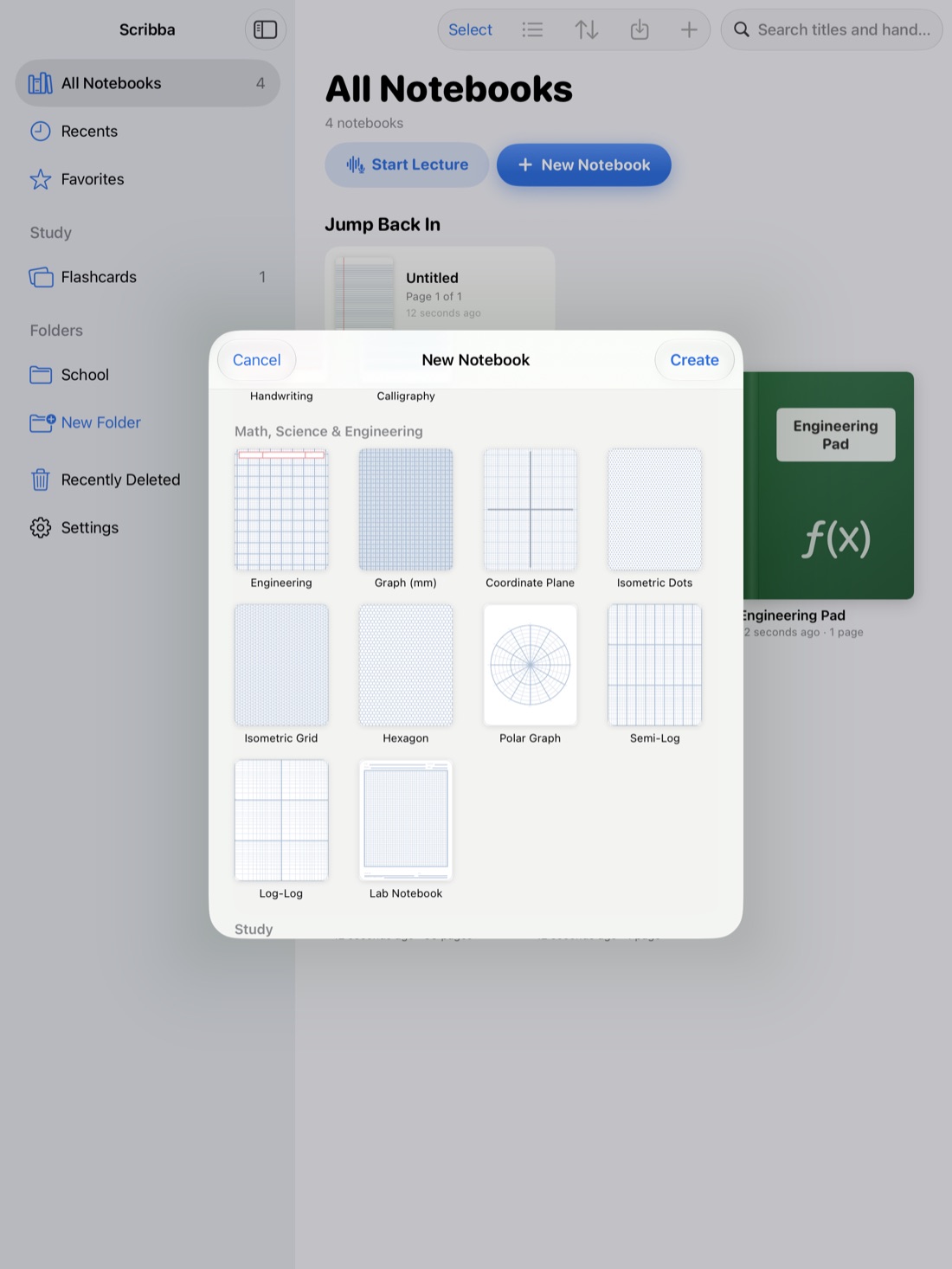
Math and chemistry notes are mostly steps. A derivation, a stoichiometry problem, a reaction mechanism: each one is a chain of small moves, and missing one move makes the rest hard to follow. That's why these classes are where handwriting still beats typing. Nobody types fractions, exponents and subscripts fast enough to keep up with a whiteboard.
An iPad gives you the speed of handwriting plus things paper can't do, like changing the paper behind your work or writing directly on a problem set. Here's how to set it up.
One thing to know up front: Scribba is a place to write math and chemistry, not a tool that does it for you. It doesn't recognize equations, convert handwriting to LaTeX, or solve problems. The thinking stays yours, which is also how you learn it.
Pick paper that fits the work
The right paper makes your work neater without any extra effort. A few guidelines:
- Grid or graph paper for anything with columns or alignment, like long division, matrices or lining up equals signs.
- Coordinate plane when you graph functions. The axes are already there.
- Engineering paper for physics-style problems and calculations in a tidy column.
- Problem set paper for homework, so each problem has its own clear space.
- Lab notebook paper for chemistry lab write-ups.
- Polar, semi-log and log-log paper for the graphs that come up in calculus, physics and lab data.
- Isometric and hexagon paper for 3D sketches, crystal structures and ring structures in organic chemistry.
Scribba has all of these among its 39 paper types, and the graph papers run edge to edge. You can change the paper on a page from the page sidebar, so if a ruled page turns into a graphing problem, you don't need a new notebook. For a tour of every option, see iPad note paper templates.
Tip: for long derivations, consider a landscape notebook (you choose the orientation when you create it). A wide page lets you keep a whole equation on one line instead of wrapping it.
Write worked examples you can learn from
The worked examples from lecture are often the most valuable thing in your notes, because exam problems tend to look like them. Write them so you can follow them a month later:
- Copy the whole problem first, including the given values and units. Half of solving is knowing what you were given.
- One step per line. Don't combine moves to save space. Space is free on an iPad.
- Line up the equals signs down the page so you can see what changed from line to line.
- Write the reason in the margin. A few words like "chain rule," "divide both sides by 2" or "convert g to mol" turn a list of lines into an explanation.
- Keep units on every number in chemistry. Writing units through a dimensional analysis problem and crossing out the ones that cancel catches a lot of mistakes.
- Box the answer so you can find it at a glance.
If your professor allows recording, it's useful here too. In Scribba, every stroke you write during a recording is linked to that moment, so later you can tap the step you didn't understand and hear the professor explain it again. See how to record a lecture on iPad.
Use the Zoom Window for subscripts and small work
Chemistry formulas and math exponents are where handwriting on glass gets messy. The 2 in H₂O, the exponent on e, the little charge on an ion: written at normal size, they turn into smudges.
Scribba's Zoom Window fixes this. It gives you a magnified strip where you write big and comfortable, and your writing lands small and neat on the page. It slides along the line as you go, so you can write a whole formula without moving it by hand. It's also good for fitting work into tight spaces, like the margin next to a problem or the space under a diagram.
For more ways to get neat handwriting, see Apple Pencil tips for note-taking.
Snap straight lines, axes and shapes
Graphs, number lines, reaction arrows and geometry problems all need straight lines. In Scribba, hold the Apple Pencil still at the end of a stroke and it snaps into a straight line, arrow, circle, ellipse, triangle, rectangle or polygon. That's handy for:
- Axes and number lines that are actually straight.
- Reaction arrows in chemistry equations.
- Triangles and circles in geometry and trig.
- Boxes around answers.
If you're drawing a lot of shapes, switch to the Shape tool and every stroke snaps. There's also a ruler for lines you want to place by hand.
Bring problem sets in as PDFs
Most math and chemistry homework arrives as a PDF. Instead of printing it, import it into Scribba, either as a new notebook or into the notebook for that class, and write your work right on it. If you need more room, pull past the last page to add a blank one for scratch work. Paper handouts can come in too: scan them with the camera.
A few setups that work well:
- Problem set beside your notes. Use Split View to open a notebook in its own window, so the problem set and your lecture notes sit side by side.
- Slides with room to write. Import lecture slides and write the worked examples right next to them. More in how to annotate lecture slides on iPad.
- Turning it in. When you're done, export the notebook or the pages you choose as a PDF and submit it however your class collects work.
Practice with your own worked examples
Rereading a solved problem feels like studying, but it mostly isn't. Solving it again is. A simple way to do that: cover the answer and the last few steps, then try to finish the problem yourself.
In Scribba, drag study tape over the boxed answer or the steps you want to hide. Work the problem, then tap the tape to peek and check. See study tape on iPad.
Frequently asked questions
Can Scribba solve equations or check my math?
No. Scribba doesn't recognize equations or solve math. It's for writing your work clearly, linking it to the lecture and studying it later.
Can Scribba turn handwritten equations into LaTeX?
No. Scribba has no handwriting-to-LaTeX conversion. If you need typed equations for a report, you'll need a separate tool for that part.
What's the best paper for graphing?
Use the coordinate plane paper for graphing functions, and graph (mm) paper when you need to plot your own axes and scale. Semi-log and log-log paper are there for data that spans large ranges.