 Scribba
A page of lecture notes records what happened in class. A summary records what you understood. They're different things, and the gap between them is usually where exam surprises come from.
Writing a short summary of each lecture is one of the highest-value habits you can build. It takes a few minutes, it shows you exactly what you didn't get, and by the end of the term it gives you a compact version of the whole course. Here's how to write one well, and how to use AI key points to check your work without letting them do it for you.
Why summarizing works
To summarize, you have to choose. Out of an hour of material, what were the three ideas that mattered? That choice makes you think about the structure of the lecture, not just its details.
If you summarize without looking at your notes, you're also practicing active recall, which is one of the most reliable ways to remember something. And any part you can't summarize is a part you don't understand yet. That's useful to know now rather than the night before the exam.
How long a summary should be
Short. Three to six sentences for a typical lecture, or a short paragraph. If it's longer than that, you're probably rewriting your notes instead of summarizing them.
A summary should fit in a box at the bottom of the page. If you couldn't read it in under a minute, cut it down.
How to write one, step by step
Do it the same day, ideally right after class. The longer you wait, the more the summary turns into a reread of your notes.
- Close your notes. Write from memory first. You'll check afterward.
- Write the question the lecture answered. Every good lecture answers something: "How do cells get energy from glucose?" "Why did the Weimar Republic collapse?" Starting with the question gives your summary a spine.
- Write the main ideas, two to four of them, each as a full sentence that says something true. Not "covered glycolysis," but "Glycolysis splits glucose into two pyruvate molecules and makes a small amount of ATP."
- Connect it. One sentence on how this lecture relates to the last one, or to the course's big theme.
- Name what's unclear. If a part of the lecture still doesn't make sense, write it as a question. That's your to-do list for office hours or the textbook.
- Now open your notes and check. Did you miss a main idea? Did you get a detail wrong? Fix the summary in a different color, so you can see what you didn't remember.
Tip: if you have only two minutes, write just the question the lecture answered and the single most important idea. That's still a summary.
Common mistakes
- Listing topics instead of ideas. "We talked about supply, demand and equilibrium" tells you nothing at exam time. Say what's true about them.
- Copying sentences from your notes. If it's word for word, you skipped the thinking. Use your own words.
- Including every detail. Examples, dates and side stories belong in your notes. The summary is for the main line.
- Writing it a week later. A late summary is better than none, but a same-day one catches gaps while you can still fill them.
Summaries at the end of the week
Once a week, read your summaries for that week in a row, and write a single summary of the week on top of them. This is where a course starts to make sense as a whole. When finals come, these weekly summaries are your study guide's skeleton. See how to make a study guide from your lecture notes.
Using AI key points as a check
AI can summarize a lecture in seconds. That's useful, but if it replaces your own summary, you lose the part that does the learning: the choosing, the recalling and the noticing what you missed.
The better approach is to write your summary first, then compare it with the AI's. Look for three things:
- Ideas the AI listed that you didn't. Did you miss them in class, or just leave them out of the summary? Check your notes.
- Ideas you listed that the AI didn't. Sometimes that's your professor's emphasis, which an AI working from the transcript won't always weigh the same way. Keep them.
- Disagreements. If your summary and the key points say different things, go back to the source.
An AI summary can be wrong or incomplete too, so treat it as a second opinion, not the answer key. How to get the key points of a lecture with AI covers this in more depth.
Summarizing lectures in Scribba
Scribba is an iPad notes app built for class. It gives each summary a home and a way to check it.
A place for the summary on every page. The Lecture Notes template has COURSE, LECTURE #, DATE and TOPIC fields, ruled lines, and a KEY TAKEAWAYS box at the bottom. Cornell Notes has a SUMMARY box at the bottom too. Paper type changes per page from the page sidebar.
Find every summary later. Start Lecture adds a dated, bookmarked page to a class notebook and starts recording, so each lecture shows in the notebook's table of contents. Jumping from summary to summary takes a tap.
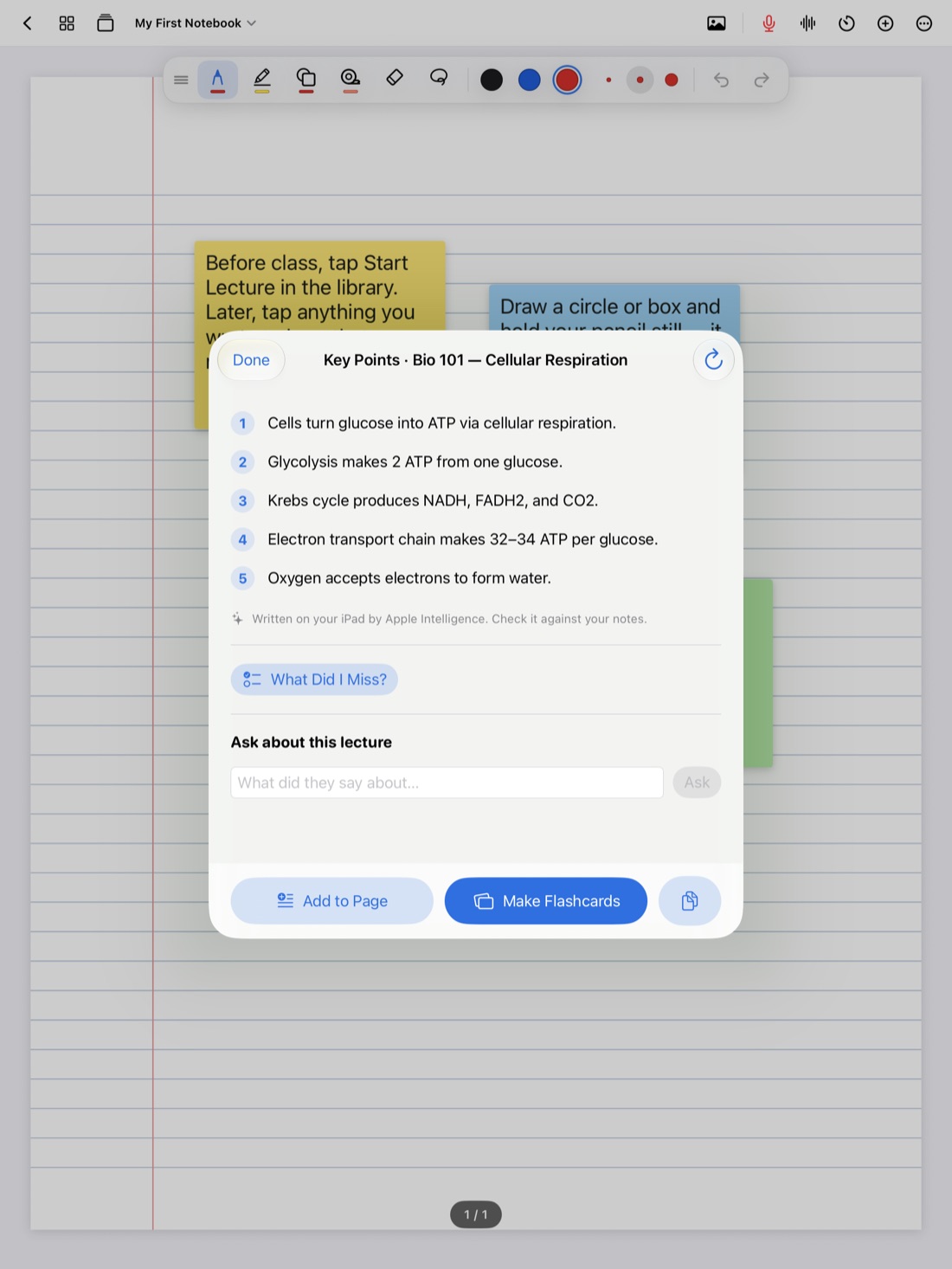
Check against key points. On iPads that support Apple Intelligence, with it turned on, Scribba writes a lecture's key points once its recording is transcribed, and can pull key points from any page of notes. Write your summary first, then open the key points. What Did I Miss? goes a step further and lists what your notes left out, ready to add to the page. It all runs on the iPad. If you'd rather not see them, turn these features off in Settings › Apple Intelligence.
Pull the term together. Study Guide puts the key points of every lecture in a notebook on one sheet, split at each Start Lecture page. Read it beside your own weekly summaries and see where they differ.
Frequently asked questions
How long should a lecture summary be?
Three to six sentences, or about a short paragraph. Short enough to read in under a minute.
Should I summarize from memory or from my notes?
From memory first, then check against your notes. That way the summary also tests you.
Can I just use the AI key points as my summary?
You can read them, but you'll learn more if you write your own first and use the key points to check it.