 Scribba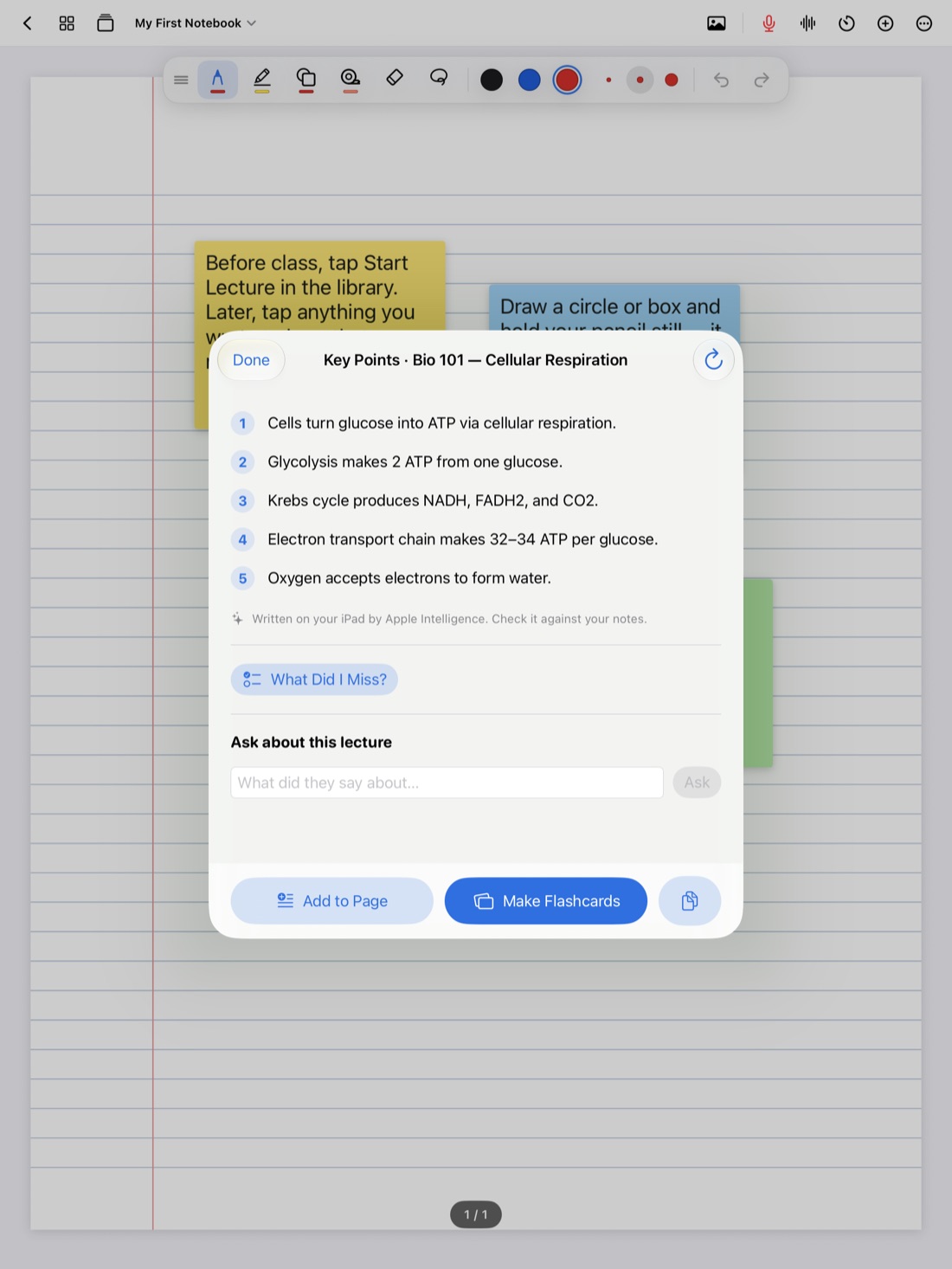
A good study guide is a whole course boiled down to what you need to know, in an order that makes sense. It's the thing you study from in the last week, and the act of making it is studying too: deciding what matters, rewording it and spotting what you don't understand.
This guide covers what belongs in a study guide, how to build one by hand from your notebook, and how Scribba can draft one from every lecture in a notebook so you start from an outline instead of a blank page. For the bigger exam plan, with a schedule, practice problems and sleep, see how to study for finals with your iPad notes.
What a good study guide has in it
Study guides come in all shapes, but the useful ones share a few things:
- One section per lecture or topic, in the order the course taught them. Later ideas usually build on earlier ones.
- The main ideas in a sentence or two each. Not everything from the lecture, just what the lecture was about.
- Key terms with short definitions, in your own words.
- One example per idea. A definition is easier to remember with a case, a problem or a picture attached.
- Connections. "This is why the thing from Week 2 matters." Exams love questions that cross lectures.
- What the professor stressed. Anything said twice, slowed down for or flagged as "on the exam."
- Questions you can test yourself with. A guide you can only reread is half a guide.
Before you start, check what the exam actually covers. The syllabus, a posted review sheet or a quick question in office hours can save you from condensing three weeks of material that won't be tested.
How to make a study guide by hand
This works on any iPad, in any app, and on paper too.
- List the lectures. Go through your notebook and write down each lecture's date and topic. If your lecture pages are bookmarked, the bookmarks are already this list.
- Recall before you reread. For each lecture, write the three or four main ideas you remember, without looking. This is active recall, and it shows you what you already know.
- Check against your notes. Now open the lecture. Fix what you got wrong and add what you missed. The things you missed are the things to study.
- Add terms and examples. Pull the key terms and one example for each main idea.
- Turn ideas into questions. "Glycolysis" becomes "Where does glycolysis happen, and what does it produce?"
- Mark your confidence. A small mark next to each topic, like a check for solid and a question mark for shaky, tells you where to spend your time.
Tip: write your study guide on Cornell Notes paper. Put the questions in the cue column and the answers in the notes area. In Scribba, Cornell cues can become flashcards on any iPad, with no Apple Intelligence needed.
That tip is worth spelling out. Scribba reads your handwriting on Cornell Notes and Vocabulary pages and turns each cue or row into a flashcard. Review the words it read and fix any it got wrong. So a handwritten study guide on Cornell paper doubles as a flashcard deck with spaced repetition. See flashcards from handwritten notes.
Study Guide in Scribba
Scribba is an iPad notebook for class. If your lectures are in it, Study Guide drafts the outline for you. It puts the key points of every lecture in a notebook onto one sheet, drawing on your handwriting, typed notes and recordings. Then you can add the guide to the notebook as pages, or turn it into flashcards.
Study Guide needs an iPad that supports Apple Intelligence, with it turned on, running iPadOS 26. It runs on the iPad itself, so nothing is uploaded and there's no per-use cost.
Why Start Lecture pages matter
Study Guide splits the sheet at each Start Lecture page. If you start each class with Start Lecture, which adds a dated, bookmarked page and starts recording, the guide comes out with one section per lecture, in the order they happened. That matches how most exams are written and how the "list the lectures" step above works. See how to start a lecture in one tap or with Siri.
Add it as pages, then make it yours
A generated study guide is a first draft. The studying happens when you work on it. Add it to the notebook as pages, then go through it with your pen:
- Recall first, then read. Before you look at each section, try to name its main ideas yourself. Then compare.
- Check every point against your notes. AI can blur two ideas together or miss what the professor stressed. If something looks off, go back to the lecture page or the recording.
- Add what it left out. Examples, the professor's emphasis, the diagram that made it click.
- Cross out what you already know cold. A shorter guide is easier to review.
- Write questions in the margins for anything you'll want to test yourself on.
- Put study tape over the answers. Drag tape over terms and key points, then tap to peek. It turns the guide into a self-test. More in study tape on iPad.
Turn it into flashcards
You can also turn the study guide into flashcards. Scribba's decks use spaced repetition, so cards come back after 1, 3, 7, 14 and 30 days, and you can study all your due cards at once. If you'd rather review somewhere else, decks export to Quizlet or Anki.
Read through the cards before you study them. If one doesn't make sense, check it against your notes before you learn it. A card you don't understand won't help you remember anything.
Use the guide in the last week
However you made it, the study guide works best as something you test yourself with, not something you reread:
- Cover and explain. Cover a section and explain it out loud. Then check.
- Start with the question marks. Spend most of your time on shaky topics.
- Redo it from memory. A day or two before the exam, write the guide's outline on a blank page from memory. Whatever you can't remember is your last review.
Frequently asked questions
Does Study Guide need recordings?
No. It draws on handwriting and typed notes as well as recordings, so it works with notebooks you didn't record. Recordings give it more to work with.
What if my iPad doesn't support Apple Intelligence?
Make your study guide by hand using the steps above. Write it on Cornell Notes paper and Scribba can still turn each cue into a flashcard, no Apple Intelligence needed.
Should I study from the generated guide as is?
Treat it as an outline. Check it against your notes, add your own examples and test yourself on it. That work is what makes it stick.