 Scribba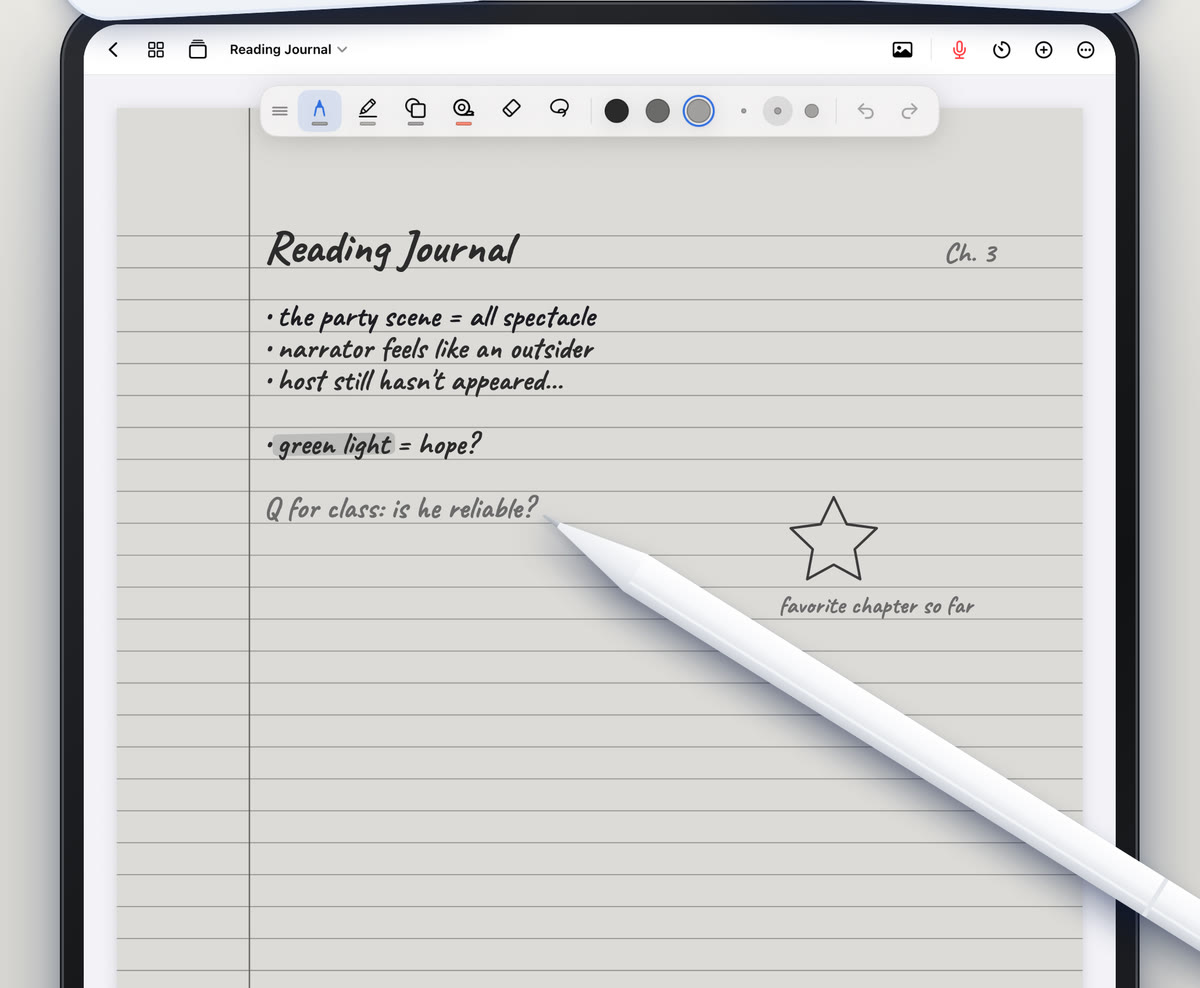
Literature classes run on reading. Most of the work happens before class, with a novel, a poem or a stack of critical essays, and class time is for discussing what you found. That changes what good notes look like. Your most important notes are often the ones in the margins of the text, and the ones that help you write the essay at the end of the unit.
Here's how to read, annotate and take notes for English and literature classes on an iPad, so that when the essay prompt arrives, your evidence is already waiting.
Annotate as you read
Annotating is a conversation with the text. It slows you down just enough to notice things, and it leaves a trail you can follow later. Some habits that work well:
- Underline sparingly. If everything is underlined, nothing stands out. Mark the lines that surprise you, confuse you or connect to something else.
- Write in the margin, not just on the line. A few words like "irony?", "echoes ch. 2" or "she's lying" are worth more than a highlight.
- Use a small set of symbols. For example, a star for key passages, a question mark for confusion, an exclamation point for a turn in the plot, a letter for each major theme. Write your key on the first page.
- Summarize each chapter or section in two or three lines at the end. You'll thank yourself when the book blurs together.
- Note page numbers for everything. You'll need them for citations.
Annotating PDFs in Scribba
Many literature courses share readings as PDFs: poems, short stories, essays, excerpts. In Scribba, import a PDF as a new notebook or into the notebook for that class, and write directly on it. The highlighter snaps its strokes straight, so highlighted lines stay neat. Pull past the last page to add blank paper for your response. The PDF's text is searchable, so you can find a word or line later. For printed handouts, scan them with the camera.
If you want the reading on one side and your notes on the other, open a notebook in its own window with Split View. See how to annotate lecture slides on iPad; the same tools work for readings.
Keep a reading journal
A reading journal is a separate place for your thinking about a text, apart from the annotations. After each reading session, write a short entry:
- What happened, in a sentence or two.
- One passage that stood out, copied with its page number.
- Why it stood out, in your own words.
- One question you'd bring to class.
Even short entries add up. By the end of a novel, you have a record of how your reading changed, and a list of passages you already care about.
In Scribba, try E-Ink Books for your reading journal. It gives any paper template a soft gray e-ink look, with pens and highlighters that write in e-ink grays. Some students like a calm page like that for longer writing sessions. Pair it with ruled or journal paper. More in E-Ink paper on iPad.
Track themes, quotes and characters
Essays ask you to make an argument across a whole text. That's much easier if you've been collecting evidence as you go, instead of flipping through the book the night before.
Set up a few tracking pages at the front of your notebook for each text:
- Themes: one section per theme, with short notes and page numbers each time it shows up.
- Quotes: exact quotations you might use, each with a page number and a word on why it matters.
- Characters: a short entry for each character, with how they change and key moments.
- Motifs and images: recurring objects, colors or settings, with page numbers.
Bookmark each tracking page so you can jump to it while reading. In Scribba, named bookmarks in the page sidebar act as a table of contents.
Tip: copy quotations exactly, including punctuation, and add the page number right away. Fixing a misquote later means finding the passage again.
Search helps here too. Scribba searches your handwriting, typed text and PDF text, from the library or inside a notebook. If you marked every appearance of a theme with the same word, like "mirror" or "debt," searching for it brings up each page. See searching handwriting on iPad.
Take notes in discussion-heavy seminars
Seminars are hard to take notes in because the important ideas come from everywhere: the professor, classmates and you. A few habits help:
- Write the question being discussed at the top of each section of notes.
- Note who said what if it helps, especially when two people disagree.
- Capture your own ideas. When a comment sparks a thought, write it down, marked so you can find it.
- Record passages the class looked at closely, with page numbers.
If you'd like to record a seminar, ask first. A discussion includes your classmates' voices as well as the professor's, and many people are less comfortable being recorded in a small group than in a lecture. Policies vary by school, professor and location, and students with accommodations may be able to record as part of them. Read is it OK to record lectures? before you ask.
If recording is allowed, Scribba links every stroke you write to that moment in the recording, so you can tap a note and hear the point being made. See how to record a lecture on iPad.
Turn your notes into an essay plan
When the prompt arrives, start with your notes, not a blank page.
- Reread the prompt and write it at the top of a fresh page.
- Go to your tracking pages and list every quote and passage that relates to it.
- Group the evidence into two to four clusters. Each cluster is a possible body paragraph.
- Write a working thesis that connects the clusters. It can change later.
- Order your paragraphs so each one builds on the one before.
- Under each paragraph, list the quotes you'll use and a sentence on what each shows.
In Scribba, you can drag pages in the page sidebar to reorder them, copy pages between notebooks, and use the lasso to move groups of notes around a page. When your plan is ready, Scribba can copy your handwriting as typed text, which gives you a head start on a draft in your word processor. Review it for misread words.
Frequently asked questions
Can I highlight and write on PDF readings?
Yes. Import a PDF into Scribba and highlight, underline and write directly on it. Its text stays searchable.
Is it OK to record a seminar discussion?
Ask first. Seminars include classmates' voices, so check your school's policy and ask your professor before recording.
Can Scribba type up my handwritten notes?
Scribba can copy, share or place a page's handwriting as typed text. Check it for misread words, especially names and quotations.