 Scribba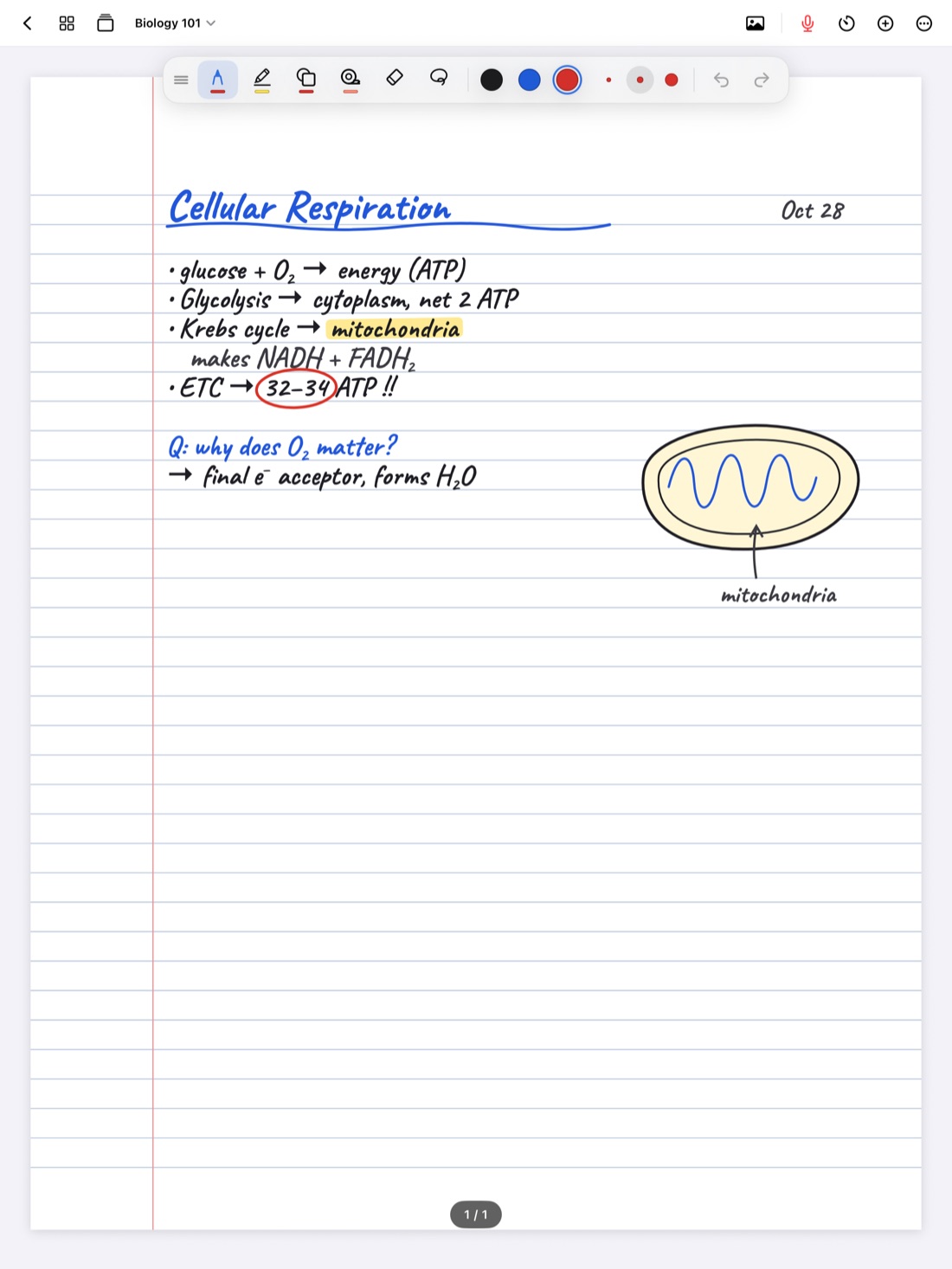
Biology asks two things of you at once. You need to learn a lot of words, and you need to understand how things move: energy through a cell, signals through a nerve, genes through generations. Good biology notes handle both. They capture terms precisely, and they show processes as pictures you can follow with your finger.
Handwriting on an iPad suits this well, because you can draw, label, erase and rearrange without starting over. Here's a way to set up your biology notes so they're useful when exams come around.
Draw the process, don't just describe it
A paragraph about glycolysis is hard to study. A diagram with arrows, inputs and outputs is much easier. When your professor walks through a process, try to sketch it as you go:
- Draw it simple. You don't need the textbook figure. Boxes, circles and arrows are enough. A cell is an oval; a membrane is a double line.
- Show inputs and outputs. For any step, write what goes in on the left and what comes out on the right. This is what exam questions usually ask about.
- Number the steps. Put small numbers next to each arrow so the order is clear when you come back to it.
- Label with leader lines. Write the label off to the side and draw a short line to the structure. Labels written on top of a drawing get crowded fast.
- Redraw after class. Drawing a process again from memory, then checking it against your notes, is one of the best ways to learn it.
Diagrams in Scribba
Scribba helps your quick sketches come out clean. Hold the Apple Pencil still at the end of a stroke and it snaps into a straight line, arrow, circle, ellipse, triangle, rectangle or polygon. That makes arrows between steps and circles around organelles neat without slowing you down. If you want every stroke to snap, switch to the Shape tool.
You can also add a photo from your camera or photo library, like a figure from the textbook or a slide on the projector, and label it with your own handwriting. If your professor shares lecture slides as a PDF, import them and write directly on the diagrams. See how to annotate lecture slides on iPad.
Use color with a purpose
Color helps in biology when it means something. Random color makes notes pretty but harder to read. Pick a small system and stick to it for the whole term. For example:
- One color for structures (organelles, tissues, organs).
- One color for processes and arrows (what happens, in what order).
- One color for molecules (ATP, glucose, NADH).
- A highlighter for terms you need to memorize.
Write your color key on the first page of the notebook so you remember it in week ten.
In Scribba, you can keep three to six favorite colors in the tool palette, so your system is always one tap away. The highlighter snaps its strokes straight, so highlighted terms stay tidy even when you're writing fast.
Keep a vocabulary page for every unit
Biology has a lot of vocabulary, and the words build on each other. A dedicated vocabulary page per unit keeps terms out of the flow of your lecture notes and makes them easy to review.
A good habit: during lecture, put a small mark next to any new term. After class, copy each one onto the vocabulary page with a short definition in your own words. Writing it again is part of learning it.
Scribba has a Vocabulary paper type made for this: write one term and its definition per row. When the page is filled in, Scribba reads your handwriting and turns each row into a flashcard. Review and fix any words it misread, then study the deck. This doesn't need Apple Intelligence. See making flashcards from handwritten notes for the details.
Scribba's flashcard decks use spaced repetition: cards come back after 1, 3, 7, 14 and 30 days, so you review terms just as you're starting to forget them. You can study every due card at once, or export a deck to Quizlet or Anki. More in spaced repetition flashcards.
Quiz yourself on diagrams with study tape
Here's a classic biology study trick: take a labeled diagram, cover the labels, and try to name every part. It works because recalling something is better practice than rereading it.
On paper you'd use sticky notes or a second, unlabeled copy. In Scribba, use study tape. Drag a strip of tape over each label on your diagram. When you study, try to name the part, then tap the tape to peek. The same works for definitions on a vocabulary page or answers in a worked problem. Read more in study tape on iPad.
Record lectures with lots of new terms
Biology lectures are full of words you've never heard before, often long ones. It's easy to mishear "phosphofructokinase" or miss a definition while you're still writing the last one.
If your professor allows it, recording helps. In Scribba, tap the record button and take notes as usual. Every stroke is linked to that moment in the recording, so after class you can tap a half-finished term and hear the professor say it again. Scribba also transcribes each recording, so you can search for a term to see how it was used, even if you never wrote it down. See how to record a lecture on iPad to get started.
Let the key points check your notes
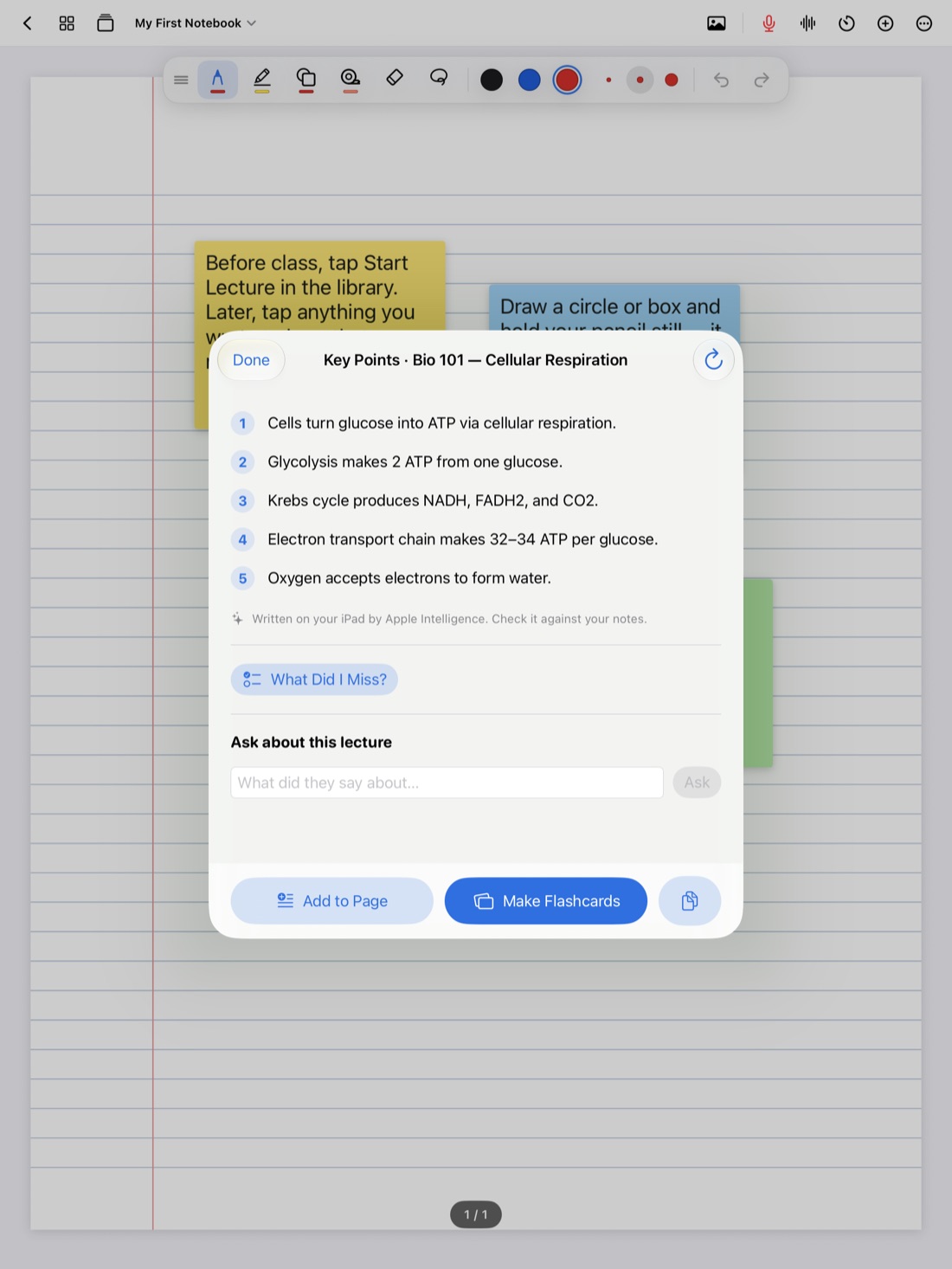
On an iPad that supports Apple Intelligence, with it turned on, Scribba writes the key points of a lecture once it's transcribed. For biology, that's a quick summary of the main processes and terms to compare with your own notes. What Did I Miss? goes a step further: it lists what the lecture covered that your notes left out, so you can add it to the page. You can also make flashcards straight from the transcript. All of it runs on the iPad itself. Learn more about key points from lectures.
Frequently asked questions
What paper is best for biology notes?
Dot grid works well for biology, because the dots help with diagrams without the clutter of full grid lines. Use ruled paper for text-heavy lectures and the Vocabulary paper for term lists.
Can I draw biology diagrams without an Apple Pencil?
Yes. Turn on Settings › Draw with Finger to write and draw with your finger. An Apple Pencil gives you finer control for small labels, though.
Do vocabulary flashcards need Apple Intelligence?
No. Flashcards from Vocabulary and Cornell Notes pages work on any iPad that runs Scribba. Apple Intelligence is only needed for flashcards made from a transcript or any other page.